

Developer’s Diary of VBox Manual: Chapter 2
It is Monday morning. You walk into the control room, coffee in hand. The phone is already ringing. There is a last-minute video clip that needs to go on air. Someone’s asking whether a file scheduled for tonight made it to the system. A producer is looking for a specific clip from months ago. You sit down, open the catalogue, and that’s where the day starts to fall into place.
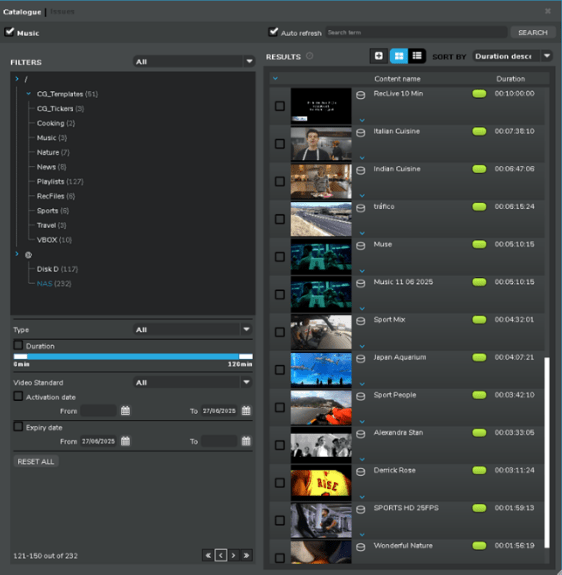
The interface is straightforward and simple. On the left are your filters. In the centre, all your content. At the top, a simple control bar with everything you need. It’s designed to save time, no searching through folders or scrolling. Everything is right where it should be.
You type a keyword into the search bar, instantly, matching results appear. Each clip is clearly marked with a status light green means it’s online and ready, red means there’s an issue like a missing file or offline storage. You don’t have to waste time checking one by one you know what’s usable right away.
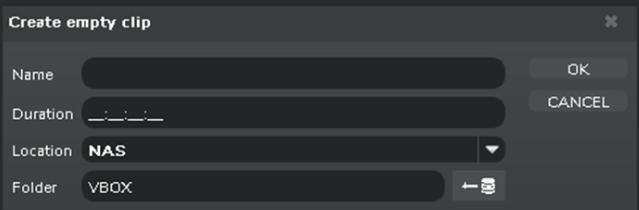
If the clip has not arrived yet, you can create an empty clip with just a title, duration, and folder. This placeholder holds the space in the playlist for when the media file comes in.
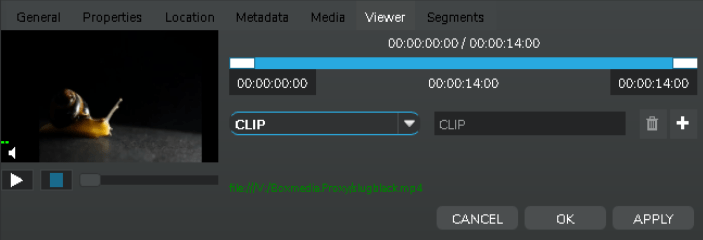
Similarly, if you want to check if the clip is already in use, it is simple you just have to right-click and select Search in Playlists. If a file needs trimming before air, you don’t need to open another app. Just double-click the clip in the results panel, go to the Viewer tab, and set in/out points. Trim it right there, inside the media catalogue, no exporting, no switching tools. You can even prepare segments in advance, for example marking ad breaks.
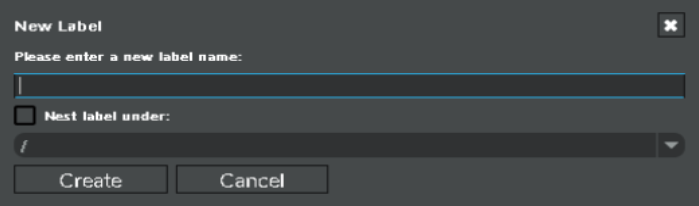
Another useful feature is labelling, it is right-click a clip, and you can view or add labels without opening another window. It keeps your workflow organized without breaking your rhythm. The system also refreshes itself automatically, so you always see the latest updates, no manual reloading.
By the end of your shift, you have searched, sorted, trimmed, labelled, and managed playlists all without leaving the catalogue because this isn’t just a storage tool it is your working environment. It is built to support the way real broadcast teams work, helping you stay in control whether you are dealing with breaking news, daily programming, or archive management, the media catalogue keeps everything connected and manageable — all in one place.
I hope you found this as interesting as it was entertaining to read.
See you in Developer’s Diary of VBox Manual #3.